AI Assistant
AI Assistant
MVP Design
MVP Design
Designing Horizon, Constella’s MVP for an AI Overlay Assistant
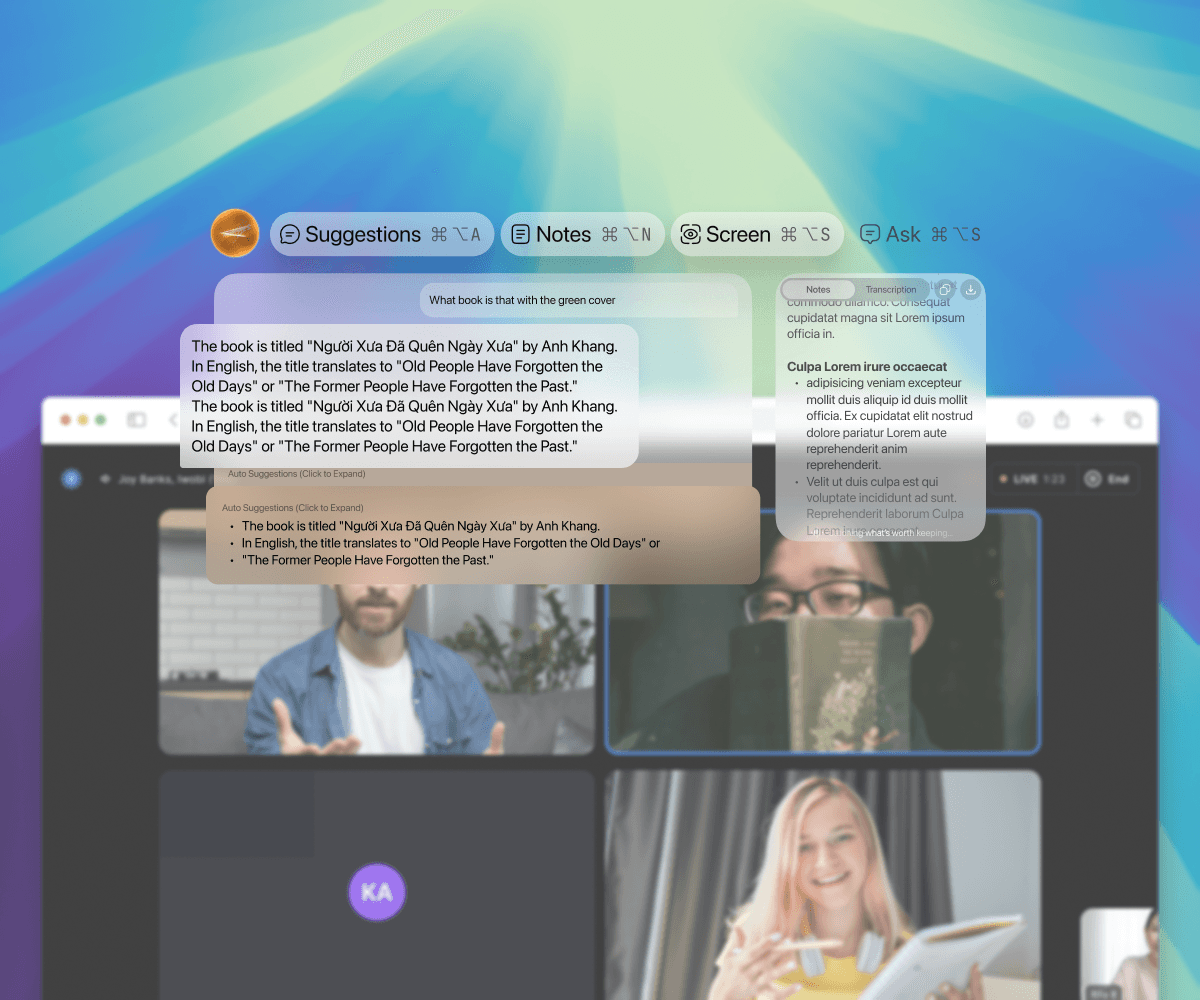
Horizon is a lightweight overlay that sits quietly at the edge of your screen, ready the moment you need clarity. Capture ideas, surface context, and access AI support — all without leaving the moment you’re in.
Services
UI UX
Services
UI UX
Services
UI UX
Stack
Figma
Stack
Figma
Stack
Figma
Timeline
7 Weeks
Timeline
7 Weeks
Timeline
7 Weeks
Horizon – The Always-There Overlay That Keeps You in Flow
Horizon was built as a fast, lightweight MVP to test a simple but important idea:
an always-there AI overlay that helps you in place — during meetings, while reading, or whenever you need quick context.
The goal was to validate the market, not perfect the product. The design phase had to be quick, focused, and practical. After validation, the team later open-sourced the app, turning it into a community-driven project.
Horizon – The Always-There Overlay That Keeps You in Flow
Horizon was built as a fast, lightweight MVP to test a simple but important idea:
an always-there AI overlay that helps you in place — during meetings, while reading, or whenever you need quick context.
The goal was to validate the market, not perfect the product. The design phase had to be quick, focused, and practical. After validation, the team later open-sourced the app, turning it into a community-driven project.
Horizon – The Always-There Overlay That Keeps You in Flow
Horizon was built as a fast, lightweight MVP to test a simple but important idea:
an always-there AI overlay that helps you in place — during meetings, while reading, or whenever you need quick context.
The goal was to validate the market, not perfect the product. The design phase had to be quick, focused, and practical. After validation, the team later open-sourced the app, turning it into a community-driven project.
Summary
Most AI assistants pull you out of the moment. Horizon took a different direction. It sat quietly on top of your screen and understood what you were doing. It captured meetings, suggested relevant answers, helped you ask better questions, and let you take quick notes without switching apps.
This MVP was designed rapidly: a calm overlay, three core modes (Suggestions, Notes, Screen), and a simple input bar that behaved like a lightweight layer over your Mac instead of a separate product.
The goal was to prove one thing:
Would people use an AI that works on top of their existing tools instead of inside its own?
Summary
Most AI assistants pull you out of the moment. Horizon took a different direction. It sat quietly on top of your screen and understood what you were doing. It captured meetings, suggested relevant answers, helped you ask better questions, and let you take quick notes without switching apps.
This MVP was designed rapidly: a calm overlay, three core modes (Suggestions, Notes, Screen), and a simple input bar that behaved like a lightweight layer over your Mac instead of a separate product.
The goal was to prove one thing:
Would people use an AI that works on top of their existing tools instead of inside its own?
Summary
Most AI assistants pull you out of the moment. Horizon took a different direction. It sat quietly on top of your screen and understood what you were doing. It captured meetings, suggested relevant answers, helped you ask better questions, and let you take quick notes without switching apps.
This MVP was designed rapidly: a calm overlay, three core modes (Suggestions, Notes, Screen), and a simple input bar that behaved like a lightweight layer over your Mac instead of a separate product.
The goal was to prove one thing:
Would people use an AI that works on top of their existing tools instead of inside its own?
1. What the MVP Needed to Solve
Avoiding context switching
People shouldn’t have to leave a meeting or tab to ask AI for help.
Making meetings easier
Real-time notes, summaries, and suggestions during calls.
Providing help based on screen context
The assistant should know what you’re looking at and adapt.
Being simple enough for fast testing
No heavy workflows. No extra UI weight. Just the essentials.
1. What the MVP Needed to Solve
Avoiding context switching
People shouldn’t have to leave a meeting or tab to ask AI for help.
Making meetings easier
Real-time notes, summaries, and suggestions during calls.
Providing help based on screen context
The assistant should know what you’re looking at and adapt.
Being simple enough for fast testing
No heavy workflows. No extra UI weight. Just the essentials.
1. What the MVP Needed to Solve
Avoiding context switching
People shouldn’t have to leave a meeting or tab to ask AI for help.
Making meetings easier
Real-time notes, summaries, and suggestions during calls.
Providing help based on screen context
The assistant should know what you’re looking at and adapt.
Being simple enough for fast testing
No heavy workflows. No extra UI weight. Just the essentials.
2. What Success Looked Like (For an MVP)
A calm overlay that sits on top of the OS
Three essential modes: Suggestions, Notes, Screen
Meeting-aware intelligence
Quick capture that syncs to the user’s tools
A design simple enough to build fast and validate fast
This phase was about validation, not polish.
2. What Success Looked Like (For an MVP)
A calm overlay that sits on top of the OS
Three essential modes: Suggestions, Notes, Screen
Meeting-aware intelligence
Quick capture that syncs to the user’s tools
A design simple enough to build fast and validate fast
This phase was about validation, not polish.
3. What I Designed
A. A Clear, Lightweight Overlay
Fast to use, fast to understand, and fast to build.
Suggestions, Notes, and Screen lived in small floating cards that appeared only when needed.
B. Meeting-Aware Smart Notes
The overlay detected when you were in a meeting and automatically captured summaries, answers, and follow-up suggestions.
3. What I Designed
A. A Clear, Lightweight Overlay
Fast to use, fast to understand, and fast to build.
Suggestions, Notes, and Screen lived in small floating cards that appeared only when needed.
B. Meeting-Aware Smart Notes
The overlay detected when you were in a meeting and automatically captured summaries, answers, and follow-up suggestions.
C. The Always-Available Input Bar
This acted as the user’s “quick brain” — ask questions instantly, without leaving the screen.
D. A Visual Style That Felt Calm, Not Distracting
Soft gradients, glass surfaces, minimal chrome — just enough clarity to feel modern without adding noise.
C. The Always-Available Input Bar
This acted as the user’s “quick brain” — ask questions instantly, without leaving the screen.
D. A Visual Style That Felt Calm, Not Distracting
Soft gradients, glass surfaces, minimal chrome — just enough clarity to feel modern without adding noise.
4. The Outcome
The MVP achieved what it needed to:
It validated interest in a screen-aware AI assistant
It showed real promise for reducing context switching
It gave early testers a simple way to capture and recall meeting notes
It proved the value of an “AI overlay” instead of a standalone app
After successful testing, the team open-sourced Horizon, allowing developers to build on top of it and evolve the concept.
4. The Outcome
The MVP achieved what it needed to:
It validated interest in a screen-aware AI assistant
It showed real promise for reducing context switching
It gave early testers a simple way to capture and recall meeting notes
It proved the value of an “AI overlay” instead of a standalone app
After successful testing, the team open-sourced Horizon, allowing developers to build on top of it and evolve the concept.
Reflection
This was an early MVP, built quickly to validate the concept, so there are areas that clearly needed more refinement — things like readability, tighter spacing, and a more compact layout. The goal at the time was speed, not polish, and there was no iteration window after launch. The project was later open-sourced, which meant I was no longer in a position to push further improvements. Even so, the MVP served its purpose: proving the value of a screen-aware, always-available AI assistant.
Reflection
This was an early MVP, built quickly to validate the concept, so there are areas that clearly needed more refinement — things like readability, tighter spacing, and a more compact layout. The goal at the time was speed, not polish, and there was no iteration window after launch. The project was later open-sourced, which meant I was no longer in a position to push further improvements. Even so, the MVP served its purpose: proving the value of a screen-aware, always-available AI assistant.